
| ID | 11526 | |
| Название | Интернет через блютуз Internet over Bluetooth | |
| Версия | 1 | |
| Модель | EL71v45 | |
| Тип | Системный | |
| Автор: | Claude | |
| Портер: | dm | |
| Конфликты: | - | |
| Зависимости: | - | |
| Скриншот: |
| |
| Доп.файл: | bt-internet-fw.zip, 2649 байт |
В атаче также патч MTU (автор — ARMenian Developer): увеличивает MTU Bluetooth с 335 до 1691 байт.
Без него Android-модем может не подключиться (по стандарту BNEP нужен MTU не меньше 1691); подключится только к ПК, и то медленнее.
На телефоне нужен любой GPRS-профиль (SIM-карта не нужна).
Как настроить профиль:
https://github.com/siemens-mobile-hacks/bt-pan/blob/main/phone-manual/how-to-setup-gprs.md
Как подключиться:
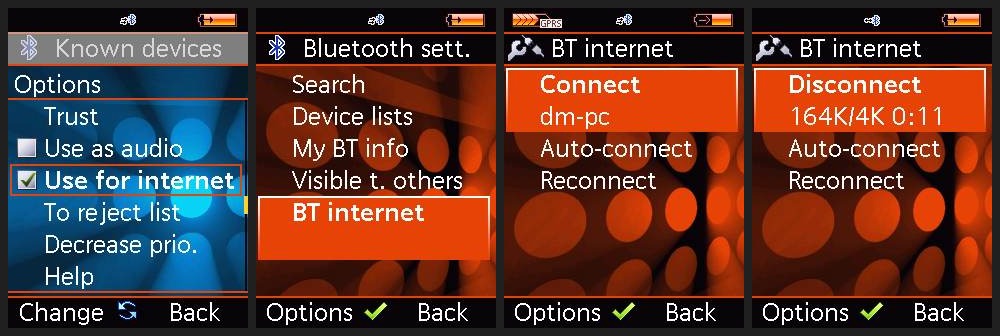
1. Включите на Android-телефоне Bluetooth-модем.
2. Выполните сопряжение устройств.
3. На телефоне: Connectivity > Bluetooth sett. > Device lists > Known devices >
выберите нужное устройство > Options > отметьте «Use for internet».
4. Connectivity > Bluetooth sett. > BT internet > Connect.
После подключения вместо имени устройства появятся таймер и счётчик трафика.
Auto-connect — подключаться к модему автоматически при включении телефона.
Reconnect — переподключаться автоматически при разрыве связи.
English:This patch lets the phone access the internet through an Android phone's Bluetooth tethering.
Also attached is the MTU patch (author: ARMenian Developer), which raises the Bluetooth MTU from 335 to 1691 bytes.
Without it, the Android phone may refuse the connection (BNEP requires an MTU of at least 1691); only a PC will connect, and more slowly.
The phone needs a GPRS profile (any settings will do).
How to set one up:
https://github.com/siemens-mobile-hacks/bt-pan/blob/main/phone-manual/how-to-setup-gprs.en.md
How to connect:
1. Turn on Bluetooth tethering on the Android phone.
2. Pair the devices.
3. On the phone: Connectivity > Bluetooth sett. > Device lists > Known devices >
select the device > Options > tick "Use for internet".
4. Connectivity > Bluetooth sett. > BT internet > Connect.
Once connected, a timer and a traffic counter replace the device name.
Auto-connect: connect automatically when the phone is switched on.
Reconnect: reconnect automatically if the connection drops.
Количество скачиваний: 5
Добавлен в базу 21.11.2026, добавил dm1
Добавить для загрузки
Скачать
Вернуться